This issue occurs due to residual files left in the APPData that need to be deleted.
Step 1: Please uninstall LG mail viewer via Add or Remove Programs.
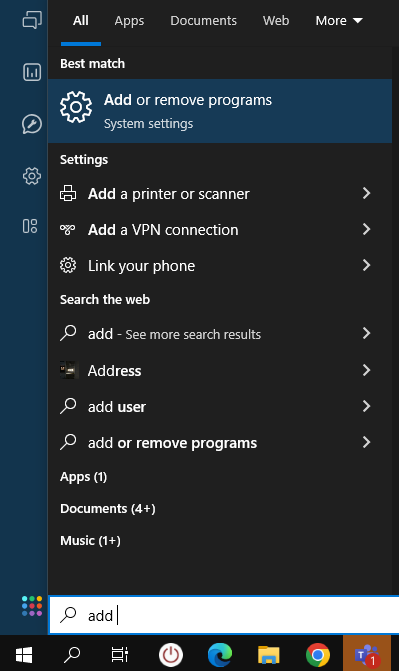
Step 1: Please uninstall LG mail viewer via Add or Remove Programs.
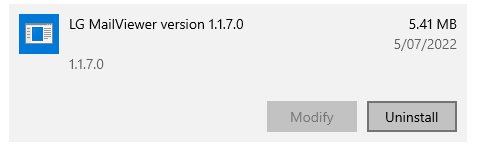
Click the uninstall button below:
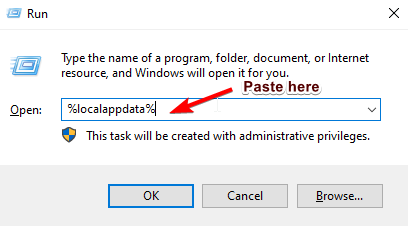
Step 2: On your Cloud, press Windows + R and paste the text below into the 'Run' text box.%localappdata%
Then click 'OK'
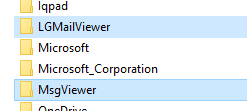
Step 3: Then delete the 2 folders below:
Step 4: Copy and install the latest MailViewer app which is found here:
S:\25. LGEAP\New 25.LGEAP\1.Software\2.LG\LG Mailviewer Setup
Step 4: Copy and install the latest MailViewer app which is found here:
S:\25. LGEAP\New 25.LGEAP\1.Software\2.LG\LG Mailviewer Setup

Kind Regards,
Was this article helpful?
That’s Great!
Thank you for your feedback
Sorry! We couldn't be helpful
Thank you for your feedback
Feedback sent
We appreciate your effort and will try to fix the article