All LG users should have administrator privileges on their local PC
If users do not have admin rights they may have some of the issues below:
- Unable to access LG file server
- Unable to connect to printers
- Unable to run printer IP address
- Cannot run administrator locked apps.
To provide admin rights to user, log into team.itops on the local PC.
1.) Open CMD > Type 'lusrmgr'> Press enter
2.) Open Groups > Administrators > Click Add
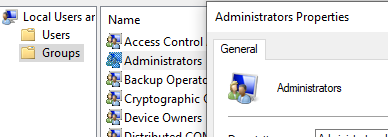
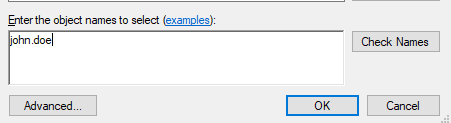
4.) Type in AD name and click Check Names, then Apply
Was this article helpful?
That’s Great!
Thank you for your feedback
Sorry! We couldn't be helpful
Thank you for your feedback
Feedback sent
We appreciate your effort and will try to fix the article