Some laptop models may not allow users to use their microphone on their bluetooth headset/wireless earbuds/airpods.
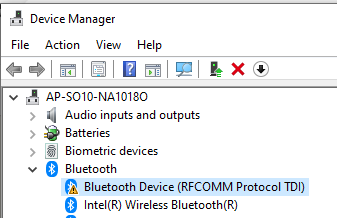
This is likely because of a failed driver.
To fix the issue
1.)Reimage the laptop with an image from a working laptop (of the same model) that does not have the error on the Bluetooth Device (RFCOMM Protocol TDI).
2.) Install appropriate software as per normal procedure
3.) Check device manager to see if warning symbol is still present.
4.)Pair bluetooth headset/wireless earpods
5.)Ensure Input and Output is correct on the Sound Settings
Was this article helpful?
That’s Great!
Thank you for your feedback
Sorry! We couldn't be helpful
Thank you for your feedback
Feedback sent
We appreciate your effort and will try to fix the article